time
Assign delegates to approve timesheets
Assign delegates to approve timesheets while you're out of office. When employees submit timesheets while an approver is absent, delegates can approve or decline them to ensure that payroll processing continues smoothly.

Key benefits
Continuous workflow: Timesheet approvals continue uninterrupted when approvers are out of the office.
Operational efficiency: Eliminates manual reassignment of approvers, reducing administrative overhead.
Enhanced user experience: Provides a reliable and transparent approval process for employees and managers.
Audit and accountability: Maintains a clear audit trail of delegated actions for governance and reporting.
How it works
Open the Configure Time page.
Enable delegation for timesheet approvals and assign users as delegates.
When you select the default delegate, that user is automatically selected for all approvers in the list.
Set out-of-office start and end dates to route approval requests to your assigned delegate.
What's changed
We've added the following labels on the Configure Time page:
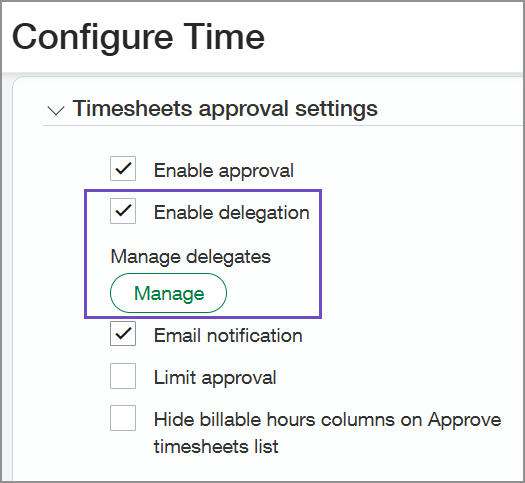
Enable delegation: Turns on delegation for timesheet approvals. When you select this checkbox, the Manage button appears.
Manage: This button allows you to assign users as delegates for approvers.
Good to know
The default delegate can only approve timesheets when acting as the approver delegate.
When out-of-office approvals are enabled, approval requests are directed to the assigned delegate and remain visible until the out-of-office expires.
Notifications
The following must be enabled so that delegates receive email notifications for any rerouted approval requests:
Email notifications enabled in the Timesheets approval settings section of Configure Time.
For more information, go to Configure Time.
Email notifications on each user preferences page.
For more information, go to Email notifications and approvals.
Permissions and other requirements
| Subscription | A subscription to at least one of the following Sage Intacct applications is required:
|
|---|---|
| Regional availability |
|
| User type | Business user with admin privileges |
| Permissions | Administration
|
| Configuration |
