Time
Access Sage Intelligent Time preferences from My preferences
Access Sage Intelligent Time (SIT) preferences directly from My preferences to quickly find and manage time-related settings. This update provides a clear access point for SIT preferences and reduces duplicate configuration.
Key benefits
Manage preferences from a familiar location: Access Sage Intelligent Time settings alongside your other personal preferences.
Quickly access SIT preferences: Easily find Sage Intelligent Time preferences when you need to make changes.
Improve navigation efficiency: Manage Sage Intelligent Time preferences without navigating through separate areas of Sage Intacct.
How it works
Select the User menu at the top of any Sage Intacct page and select My preferences.
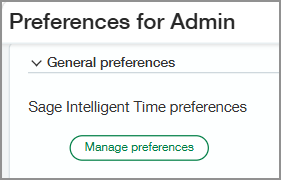
Under the General preferences section, select Manage preferences to open the Time preferences page.
What's changed
You can now access Sage Intelligent Time preferences from My preferences in the General preferences section. Previously, SIT preferences were available only through Time menu.
Permissions and other requirements
| Subscription | A subscription to at least one of the following Sage Intacct applications is required:
|
|---|---|
| Regional availability |
|
| User type | Business Employee Project Manager |
| Permissions | Time
For the Advanced preferences tab:
|
| Configuration |
