Fixed Assets Management
Reverse asset disposals
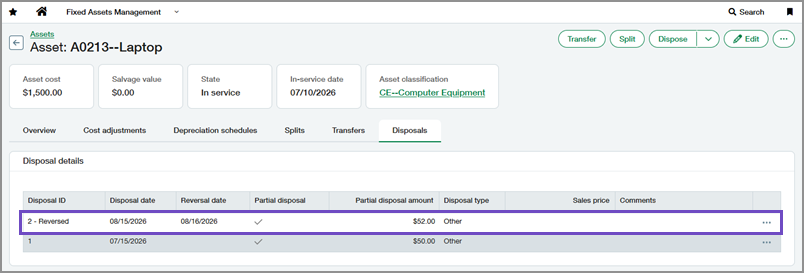
You can now reverse full and partial asset disposals in Fixed Assets Management. Reversing a disposal creates offsetting journal entries and restores the asset and related depreciation information to its state before the disposal. This helps you correct disposal errors while preserving posted accounting activity.
Previously, you could only revert disposals, which deleted the original journal entries. In some regions, accounting standards require posted transactions to be reversed rather than deleted.
Key benefits
-
Correct disposal errors with confidence: Reverse full or partial disposals, automatically restoring the asset to its previous state.
-
Preserve posted accounting activity: Create offsetting journal entries instead of deleting existing disposal postings.
-
Reduce manual effort: Eliminate manual journal entry adjustments in the General Ledger.
-
Support regional accounting requirements: Reverse posted transactions in regions where journal entries cannot be deleted.
How it works
-
Set the Correction treatment to Reverse.
-
View an asset and go to the Disposals tab.
- Select Reverse for a partial or full disposal.
- Review the resulting journal entries:
For depreciable assets, view the entries from a depreciation schedule.
For nondepreciable assets, view the entries from the Disposals tab.
What's changed
A Reverse option is now available on the Disposals tab for partial and full disposals.
Reversing a disposal does the following:
-
Creates a journal entry that mirrors the original disposal journal entry by reversing the debit and credit amounts.
-
Restores the asset and related depreciation schedules to their state before the disposal.
-
Retains the original disposal record on the Disposals tab, marks it as reversed, and records the reversal date.
Good to know
-
To use this feature, Correction treatment must be set to Reverse in Fixed Assets Management configuration. With this release, you can also switch between Revert and Reverse configurations.
-
Reverse the most recent disposal before reversing earlier disposals.
-
Assets with reversed disposals cannot be deleted.
Permissions and other requirements
| Subscription |
Fixed Assets Management Administration (for setup) |
|---|---|
| Regional availability |
All regions |
| User type |
To configure this feature: Business user with admin privileges To use this feature: Business |
| Permissions |
To configure this feature: Administration
To use this feature: Fixed Assets Management
|
| Configuration |
In Fixed Assets Management configuration, Correction treatment must be set to Reverse. |
