About the import service
Related information
 Related topics
The Sage Intacct import service provides a structured, user-friendly workflow for importing data into Intacct. You can preview, validate, and correct data in the import service before finalizing the import—ensuring accuracy and reducing errors.
The import service simplifies spreadsheet selection and field mapping, making the process reliable and repeatable. It also learns from your previous imports, streamlining future tasks.
The import service includes:
-
A workspace that remembers your previous imports.
-
Errors detection at the line and field level, with error messages at the point of need.
-
AI-assisted field mapping that improves over time as you do more imports.
-
Support for Excel files with multiple tabs.
Before you begin
Intacct recommends that you download a template. This provides you with the most current fields based on your company information.
You can use your own existing Excel or CSV file to begin an import. During the mapping process of the import service workflow you’ll map your columns to the corresponding fields in Intacct.
The import service workflow
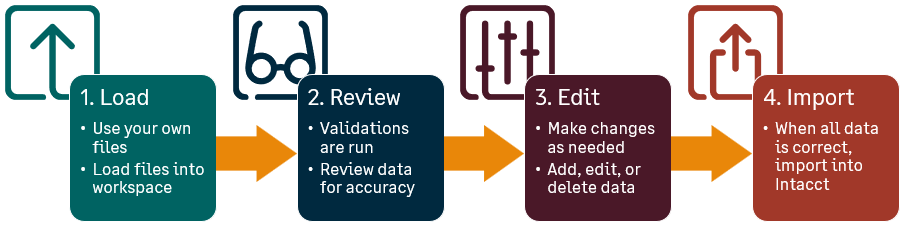
The process consists of these steps:
-
Load your file into the import service workspace.
Select the tab from your own file that you want to import first. This loads your data into the import workspace.Map your column headers to the Intacct fields.
You can preview data and exclude columns by leaving destination fields blank. This mapping determines where the information will go in Intacct. -
Review your data
The import service runs data validations against the file that you load to the workspace. If errors are found, such as missing information or a journal entry is out of balance, the specific cells that need attention are highlighted for you.
-
Use built-in tools to fix issues directly in the review sheet. You can edit all of the data from your file in the review sheet. Address any errors that were found, or add data that was missing. Revalidate your data before importing.
-
Import your updated data into Intacct
After you’ve edited and reviewed your updated data, you can Import your data into Intacct. The review and edit steps of the import process help to ensure that accurate data is imported into Intacct.
Available for import
The following imports are available for use with the import service.
Imports marked as Early Adopter or General availability are available to all users who have permissions to the respective Intacct areas. Imports marked as Beta are available only to users enrolled in the Beta program.
For more information about the status of an import, see Early adopters and Betas.
Accounts Payable
| Import | Create | Update | Status | Help |
|---|---|---|---|---|
| Adjustments | Yes | Yes | NEW: Beta | Accounts Payable adjustments |
| Bills | Yes | Yes | Early adopter | Bills |
| Vendor | Yes | Yes | Early adopter | Vendors |
Accounts Receivable
| Import | Create | Update | Status | Help |
|---|---|---|---|---|
| Advances | Yes | Yes | Beta | Accounts Receivable Advances |
| Customers | Yes | Yes | Early adopter | Customers |
| Invoices | Yes | Yes | Beta | Invoices |
Cash Management
| Import | Create | Update | Status | Help |
|---|---|---|---|---|
| Checking accounts | Yes | Yes | Beta | Checking accounts |
| Savings accounts | Yes | Yes | Beta | Savings account |
Company
| Import | Create | Update | Status | Help |
|---|---|---|---|---|
| Classes | Yes |
Update |
General availability | Classes |
| Contacts | Yes | Yes | General availability | Contacts |
| Departments | Yes | Yes | General availability | Departments |
| Employees | Yes | Yes | Beta | Employees |
| Entities | Yes | Yes | Early adopter | Entities |
| Locations | Yes | Yes | General availability | Locations |
| Users | Yes | Yes | NEW: Beta | Users |
Consolidation
| Import | Create | Update | Status | Help |
|---|---|---|---|---|
| Consolidation books | Yes | Yes | Beta | Consolidation books |
| Ownership structures | Yes | Yes | Beta | |
| Ownership structure periods | Yes | Yes | Beta |
Construction
| Import | Create | Update | Status | Help |
|---|---|---|---|---|
| Standard tasks | Yes | Yes | Beta |
WIP management
| Import | Create | Update | Status | Help |
|---|---|---|---|---|
| WIP schedule project | No | Yes | Early adopter | WIP schedule project |
Contracts
| Import | Create | Update | Status | Help |
|---|---|---|---|---|
| Contracts | Yes | Yes | Beta | Contracts |
| Contract lines | Yes | Yes | Beta | Contract lines |
Expenses
| Import | Create | Update | Status | Help |
|---|---|---|---|---|
| Employees | Yes | Yes | Beta | Employees |
| Employee expenses | Yes | Yes | NEW: Beta | Employee expenses |
Fixed Assets Management
| Import | Create | Update | Status | Help |
|---|---|---|---|---|
| Assets | Yes | Yes | General availability |
General Ledger
| Import | Create | Update | Status | Help |
|---|---|---|---|---|
| Chart of accounts | Yes |
Update |
General availability | Chart of accounts |
| General Ledger journal entries | Yes | No | General availability | General Ledger journal entries |
| Statistical accounts | Yes |
Update |
General availability | Statistical accounts |
Inventory Control
| Import | Create | Update | Status | Help |
|---|---|---|---|---|
| Warehouses | Yes | Yes | Early adopter | Warehouses |
Projects
| Import | Create | Update | Status | Help |
|---|---|---|---|---|
| Employees | Yes | Yes | Beta | Employees |
| Projects | Yes | Yes | Beta | Projects |
| Project resources | Yes | NEW: Beta | Project resources | |
| Tasks | Yes | Yes | Beta | Tasks |
| Task resources | Yes | Yes | NEW: Beta | Task resources |
Join the Beta program
We invite you to explore the new capabilities of our imports in Beta.
Your insights are incredibly valuable. By signing up via the form linked below, you'll not only get early access but also have the opportunity to shape the future of this feature. After you try it out, we'd love to hear your feedback.
Next steps
