Manage Projects records
Related information
 Related topics
Manage Projects allows you to update numerous project records simultaneously while also improving project performance.
Update records on several projects simultaneously
Manage Projects allows you to filter and select multiple projects, modify any number of records on those projects, then interactively apply bulk edits simultaneously. The updates for the projects are processed offline for efficiency. Detailed logs for the offline job provide up-to-date status and error handling.
You can edit project records in all entities. When you’re working at an entity level, you can update the projects found at that entity. When you’re working at Top level, you can update the projects listed at the Top level, along with the entity-specific projects.
Manage Projects workflow
Managing Projects allows you to manage large volumes of active projects efficiently using this simple mass update process.
- Set the Manage Projects permission for the necessary user type or role.
- Filter a list of projects with records that need to be updated.
- Choose the projects to be updated, then select Edit.
- Change the desired fields and select Save.
For detailed instructions, see Update the records for multiple projects.
Set the Manage Projects permission
| Subscription |
Projects |
|---|---|
| Regional availability |
All regions |
| User type |
Business user with admin privileges Business user Construction Manager Project Manager |
| Permissions |
Projects:
Users must have access to the projects that they’re updating. |
Typically, permissions are set by user type, or role, for efficient manageability. However, you can also set permissions individually, on a user by user basis as needed.
- Go to Company > Admin > Users, roles, and groups > Roles.
- Find the User type or Role in the list and select Subscriptions.
- Go to the Projects application and select Permissions.
- Select the Manage Projects check box, along with any other necessary permissions, and then select Save.
Update multiple records on selected projects
The ability to update multiple records across several projects allows you to manage your company projects more efficiently.
For example, at the end of the year you might want to change to status of the previous year's completed projects. The Manage projects feature allows you to filter for a completed project status with an end date before the new year. In the resulting project list, you can then select the projects, change the status to inactive, and update all of those projects at once.
| Subscription |
Projects |
|---|---|
| Regional availability |
All regions |
| User type |
Business user with admin privileges Project Manager |
| Permissions |
Admin, Projects: List, View, Add, Edit, Delete, Configure, Manage Projects Project Manager: List, View, Add, Edit, Manage Projects Users must have access to the projects that they’re updating. |
- Go to Projects > Setup > Projects and filter the list of projects as needed.
- Select the checkbox to the left of each project that has records you want to update.
- Select Update fields at the top of the list.
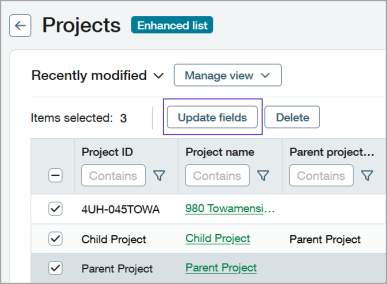
- In the Update fields dialog, specify the values you want updated on the selected projects.
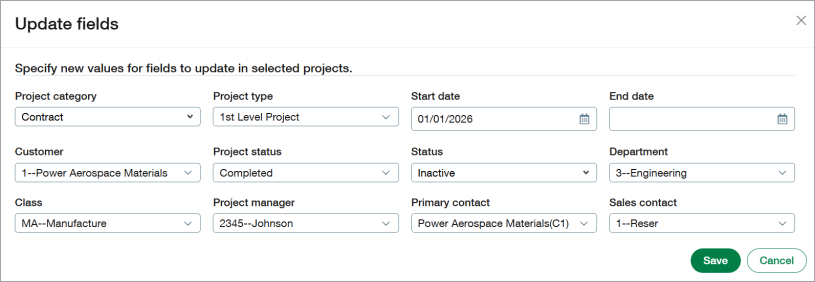
- Select Save. An offline job notification appears at the top of the page.

