Fixed Assets Management
Summarize depreciation postings
You can now reduce General Ledger volume by summarizing depreciation postings across assets that share the same accounting attributes. This helps improve posting performance and makes depreciation entries easier to review and reconcile. Previously, each depreciation entry created a separate journal entry.
Key benefits
-
Reduced GL volume: Combine depreciation postings across multiple assets into a single summarized journal entry.
-
Simplified reconciliation: Review depreciation activity more quickly with fewer journal entries.
-
Clear visibility: See how individual asset depreciation rolls up into summarized postings.
What's changed
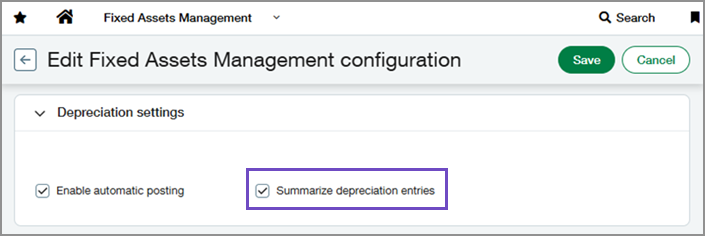
The Summarize depreciation entries setting lets you control how depreciation is posted in Fixed Assets Management. You can turn this setting on or off at any time. Changing it only applies to future depreciation postings.
When summarization is turned on, Fixed Assets Management groups depreciation postings across assets into a single journal entry if the postings share the following attributes:
-
Journal
-
Actual posting date
-
Accumulated depreciation GL account
-
Depreciation expense GL account
-
Location dimension
How it works
-
Go to Fixed Assets Management > Setup > Configuration.
-
Select Edit.
-
In the Journals and accounts section, set Correction treatment to Reverse.
Setting Correction treatment to Reverse is permanent. After you set it, you cannot use any revert actions, such as reverting transfers or disposals. -
In the Depreciation settings section, select Summarize depreciation entries.
-
Select Save.
-
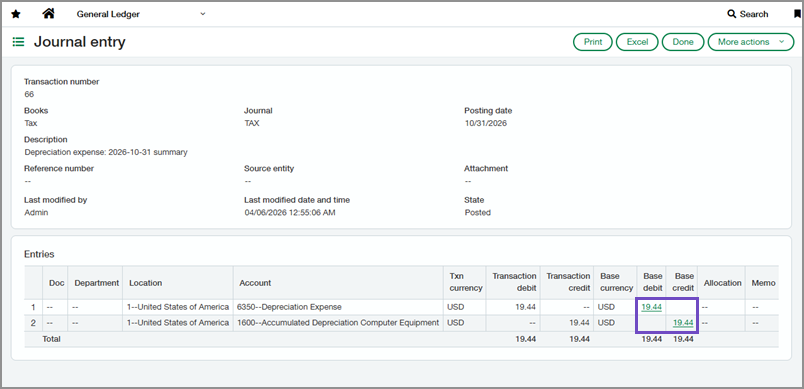
Open a summarized journal entry.
You can access the journal entry from Fixed Assets Management by selecting Journal entries next to a depreciation entry that was included in a summary.
-
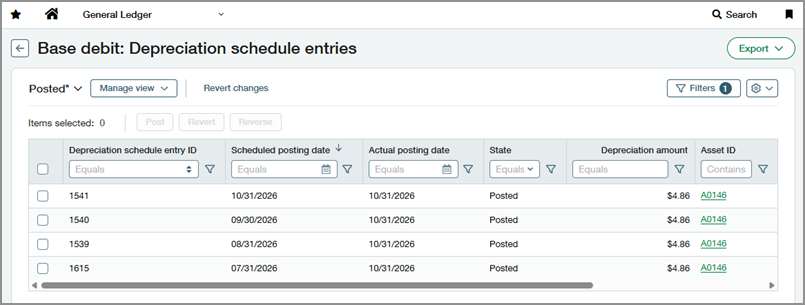
Select the Base debit or Base credit amount to drill down.
The underlying depreciation entries included in the summary are shown.
Permissions and other requirements
| Subscription |
Fixed Assets Management Administration (for setup) |
|---|---|
| Regional availability |
All regions |
| User type |
Business user with admin privileges (for setup) Business |
| Permissions |
Fixed Assets Management
Administration (for setup)
|
| Configuration |
Fixed Assets Management configuration:
|
| Restrictions |
|
