Order Entry
Variable-quantity and tiered billing for billing groups
Improve billing accuracy by invoicing customers based on actual activity such as transactions, hours, or units. Quantity entries capture billable activity and supply quantities for sales invoices generated from billing groups. For an even more powerful billing workflow, you can combine variable quantities with Order Entry price lists and tiered pricing to automatically calculate charges based on recorded activity and pricing rules. This enhancement enables scalable, quantity-based billing without requiring manual calculations.
Key benefits
Flexible pricing: Calculate variable-quantity charges using manually entered unit prices or Order Entry price lists, including tiered pricing.
Reduced manual effort: Use quantity entries as the source of billed quantities, eliminating the need for separate calculations.
Scalable billing workflows: Bill large volumes of activity without maintaining quantities on each charge.
Improved billing accuracy: Generate invoices using actual recorded quantities instead of estimates.
Multiple data entry options: Create quantity entries through the Quantity entries page, CSV imports, or APIs.
How it works
Set up an Order Entry price list and configure tiered pricing if you want to bill using Volume, Step, or Absolute pricing methods.
For more information, see Apply flexible pricing to billing groups with OE price lists.
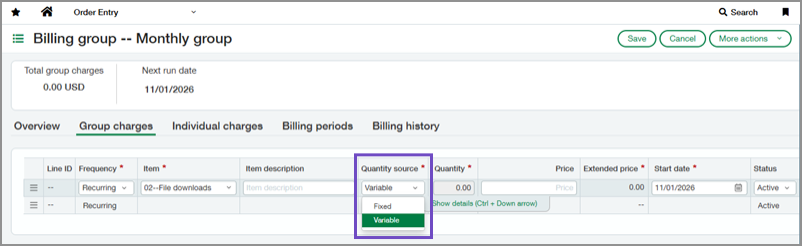
Add a group or individual charge to a billing group and set Quantity source to Variable.
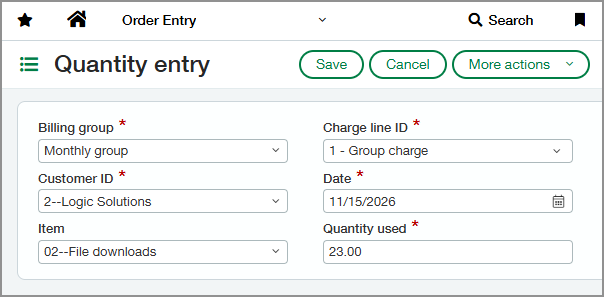
Create or import quantity entries to record billable activity.
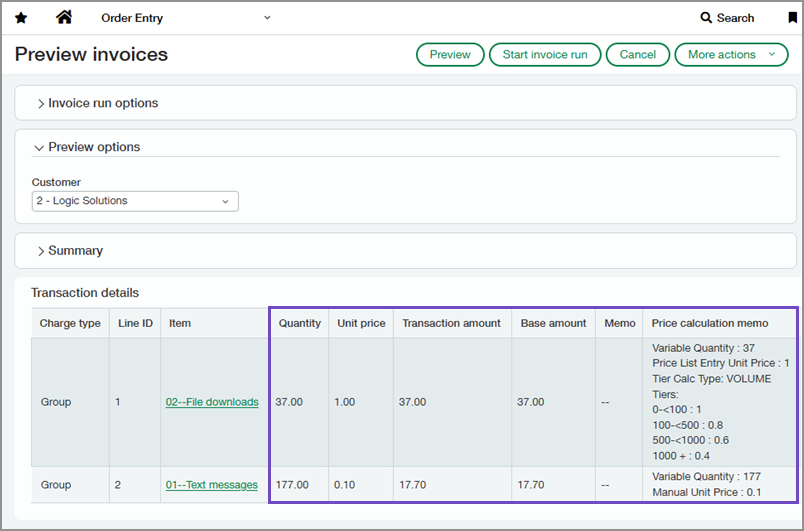
Preview invoices to review quantities, pricing, and calculated amounts.
During invoice generation, Sage Intacct uses quantity entries to determine billed quantities and calculate charges.
What's changed
Charges now include a Quantity source field.
Fixed charges use a quantity entered on the charge line. Variable charges use quantity entries to determine the billed quantity.
Quantity entries are a new record type for capturing billable activity used in variable-quantity billing workflows. Each entry identifies the customer and charge being billed.
Invoice preview displays the quantities used for billing along with associated pricing calculations and invoice amounts.
Good to know
Intacct uses the billing group's schedule periods to determine which unbilled quantity entries are included in an invoice run. Each schedule period spans from the previous scheduled invoice date through the day before the current invoice date.
You can enter multiple quantity entries for the same customer and charge. Quantity entries for that customer and charge that fall within the same schedule period are summed when calculating billed quantities.
Quantity entries added after invoice generation do not update previously generated invoices.
Permissions and other requirements
| Subscription | Order Entry |
|---|---|
| Regional availability | All regions |
| User type | Business |
| Permissions | Set up price lists
Set up billing groups and charges
Manage quantity entries
Preview invoices and view invoice runs
|
