Order Entry
Apply flexible pricing to billing groups with OE price lists
Use an Order Entry price list to calculate billing group charges, instead of entering prices manually. For more advanced pricing scenarios, you can also set up tiered pricing that adjusts charges based on total quantities, progressive quantity tiers, or fixed tiers. This enhancement supports more flexible billing models while reducing manual price calculations. Sage Intacct applies the pricing during sales invoice generation and displays the calculation details during invoice preview.
Key benefits
Scalable and consistent pricing: Define pricing rules once in an Order Entry price list and apply them consistently across billing group invoices.
Flexible pricing models: Use standard price list pricing or configure tiered pricing to support a variety of quantity-based billing scenarios.
Reduced manual calculations: Automatically apply price list and tiered pricing calculations during invoice generation instead of manually calculating charges.
Transparent pricing details: Review the quantity, pricing method, tiers, unit price, and calculated amount in invoice preview.
How it works
Create or update an Order Entry price list and add price list entries for the items used by your billing group charges.
Optionally, enable tiered billing on a price list entry, select a tier pricing method, and define the tiers.
Create or update a billing group and assign a default price list.
Create charges that use the price list.
Preview invoices to review pricing calculations.
Sage Intacct automatically applies the applicable price list pricing and tier calculations during invoice generation.
What's changed
Billing groups support Order Entry price lists
Use Order Entry price lists as the pricing source for billing group charges.
Billing groups include a Default price list field.
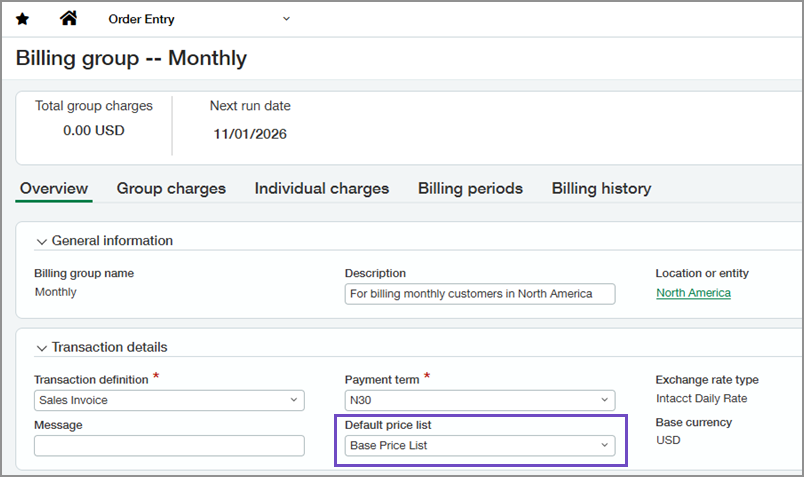
When the billing group's selected transaction definition has an associated price list, that price list is automatically populated as the billing group's default price list. You can select a different default price list for the billing group if needed.
Charges inherit the billing group's default price list. You can override the price list on charges when needed.
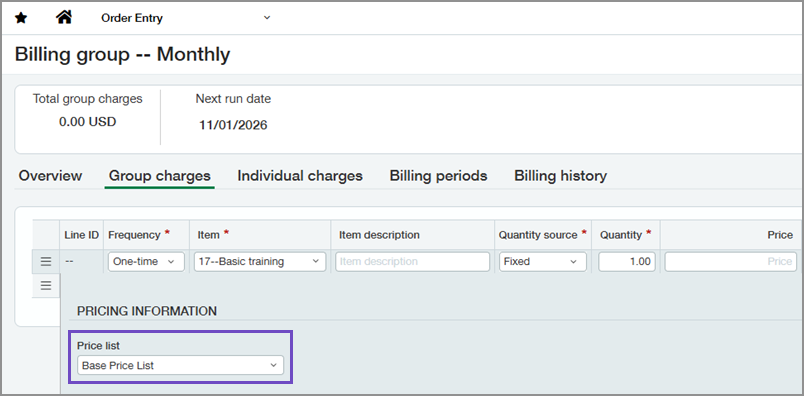
If a charge does not have a manually entered price but does have an assigned price list, Sage Intacct calculates the price from the selected price list during invoice generation.
Order Entry price lists support tiered pricing for billing groups
Order Entry price list entries now include an Enable tiered billing option for billing group pricing. After enabling, define quantity-based tiers and select from one of the following pricing methods:
Volume: The entire quantity is priced at the rate of the tier in which the total quantity falls. Only one tier rate applies per transaction.
Step: Quantity is priced at successive tier rates. Units in Tier 1 are billed at the Tier 1 rate; units in Tier 2 at the Tier 2 rate; and so on. Multiple tier rates apply within a single transaction.
Absolute: A flat charge applies when the total quantity falls within the tier range. The charge is a fixed amount, not a per-unit rate.
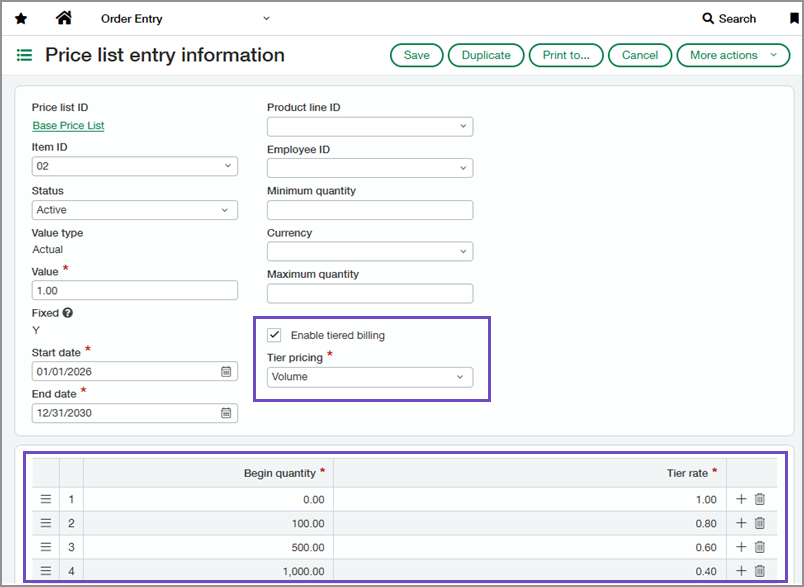
Invoice preview provides pricing calculation details
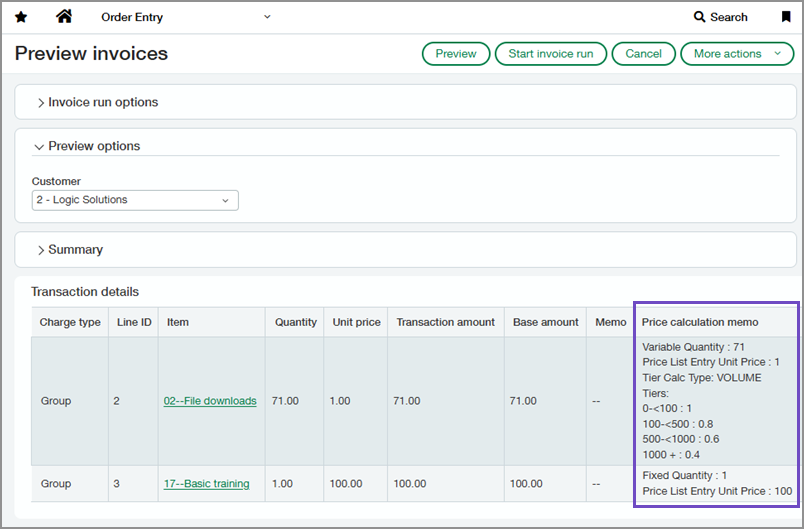
Invoice preview now includes a Price calculation memo field that displays pricing calculation details, including:
Quantity type
Quantity used in the calculation
Tier pricing method
Tier information
You can also review the calculated amounts in the invoice preview.
Good to know
Changing the billing group's default price list does not update existing charges. The default price list is applied only when creating new charges.
To calculate pricing from a price list, ensure the charge has a price list assigned and leave the price field blank.
Tiered price list entries support only Non-inventory and Non-inventory (sales only) item types.
Markup and discount value types are not available for tiered price list entries. Only the Actual value type is supported.
Permissions and other requirements
| Subscription | Order Entry |
|---|---|
| Regional availability | All regions |
| User type | Business |
| Permissions | Set up price lists
Set up billing groups and charges
Preview invoices and view invoice runs
|
